问题
在项目中很多地方用到弹窗,每个地方都需要在template中写组件el-dialog,还需要维护状态,非常麻烦;有没有一种方案能解决这个问题:使用函数的方式调用,不需要在模版中显示的声明弹窗组件,支持通过参数的方式传入需要弹窗的组件,并且能自己管理显示/隐藏的状态?
借鉴思路
在上家公司,为了方便dialog的统一管理,采用初始化项目时,通过vue plugin的形式,遍历整个views目录,将所有约定的.dialog的文件统一挂载到实例上,plugin会将统一暴露出各种事件供调用者使用;这种方式虽然避免了在业务组件中写非常多的el-dialog,但是同样也带来了一些问题:
初始化时,将所有 dialog 挂载到实例上,会导致实例变的很庞大,对性能不友好;
组件名是通过文件夹加文件夹的形式命名,如果嵌套过深,会导致命名非常长,很不利于代码的阅读;
弹窗和弹窗中的业务组件还是没有有效的分离,存在强关联;
但同样,这样做也有很多好处,在中后台业务组件中,可以不用写el-dialog,也不用关系弹窗的显示隐藏状态,只需要关注emit出来的事件和数据,编码从命令式变成了声明式,更利于阅读;
有什么方式能将好处留下,并把缺点给优化呢?
解决方式
针对这些缺点,需要思考出有效的解决方案;目前项目已全面转向Vue3,以下采用新的Composition API来完成。
按需挂载
对于第一个问题,最好的方式是按需挂载,需要弹窗的时候再初始化,避免提前生成占用内存。
首先需要在顶层有一个挂载点,并将挂载方法全局注入;
// MountComponentProvider.ts
const MCPKEY = Symbol("MountComponentProvider");

export const MountComponentProvider = defineComponent({
  name: "MountComponentProvider",
  components: {
    MountComponent, // MountComponent为组件载体
  },
  setup(_, { slots }) {
    // useMountComponent 提供挂载方法 mount
    // 通过 mountNodes 将挂载方法和载体连接
    const [mountNodes, mount] = useMountComponent();
    provide(MCPKEY, mount);
    return () => {
      // 默认插槽为App.vue中需要渲染的业务组件,使用 MountComponentProvider 将其包裹
      return [slots.default!(), h(MountComponent, { mountNodes })];
    };
  },
});
// useMountComponent.ts
export const useMountComponent = function (): [mountNodes: any, Mounted] {
  let id = 0; // 生成 id 用于组件管理
  // 通过 mitt 与 MountComponent 通讯
  const mountNodes = mitt();
  return [
    mountNodes,
    // 通过返回 mounted 方法形成闭包
    function mounted(
      CustomComponents,
      componentProps,
      componentEmits,
      options,
    ) {
      id += 1;
      const defaultOptions: MutateMountComponentOptions = {
        keepAliveId: CustomComponents.name,
        keepAlive: false,
      };
      // 调用时触发 open 事件,后续载体中会监听这个事件,同时挂载组件
      // 并将组件的所有信息传入 MountComponent 载体
      mountNodes.emit("open", {
        id,
        component: CustomComponents,
        props: componentProps,
        emits: componentEmits,
        options: Object.assign({}, defaultOptions, options),
      });
      return {
        // 返回关闭和更新方法
        close() {
          mountNodes.emit("close", id);
        },
        update(newProps) {
          mountNodes.emit("update", {
            id,
            props: newProps,
          });
        },
      };
    },
  ];
};
到这一步,挂载点和对外暴露的挂载方法已经完成,业务只需要在代码中执行:
mounted(dialogComponent, ...)
就能实现组件的挂载;
管理挂载的组件
MountComponent作为载体,不负责渲染组件,只负责组件的管理与通讯:
// MountComponent.ts
export const MountComponent = defineComponent({
  name: "MountComponent",
  components: { MountNode }, // 真正负责渲染的组件
  props: {
    mountNodes: {
      type: null,
      required: true,
    },
  },
  setup(props: { mountNodes: Emitter<any> }) {
    const showNodes = ref([]);
    const nodeRefs = new Map<number, any>();
    const handelClosed = () => {
      // handle close
    };

    const handelEmitterOpen = () => {
      // do open
    };
    const handelEmitterUpdate = () => {
      // do update
    };
    const handelEmitterClose = (id: number) => {
      // do close
    };
    onMounted(() => {
      props.mountNodes.on("open", handelEmitterOpen);
      props.mountNodes.on("close", handelEmitterClose);
      props.mountNodes.on("update", handelEmitterUpdate);
    });
    onUnmounted(() => {
      props.mountNodes.off("open", handelEmitterOpen);
      props.mountNodes.off("close", handelEmitterClose);
      props.mountNodes.off("update", handelEmitterUpdate);
    });
    return () => {
      return unref(showNodes).map((node) =>
        h(MountNode, {
          key: node.id,
          node,
          onClosed() {
            handelClosed(node.id);
          },
          ref(nodeEl) {
            // 使用 map 存储 VNode 用于触发 open 和 update
            nodeRefs.set(node.id, nodeEl);
          },
        }),
      );
    };
  },
});
在组件挂载时,监听open、close、update事件,管理组件实例;在接收到数据后,重新使用MountNode渲染弹窗;
在MountComponent中,showNodes负责存储组件实例(因为可能会一次性打开多个弹窗,可以实现自定义的keepalive),而nodeRefs则负责触发事件(使用map存储,更高效)。
具体实现挂载
const MountNode = defineComponent({
  name: "MountNode",
  props: ["node"],
  setup(props: MountNodeProps, { expose, emit }) {
    const visible = ref(false);
    const node = ref(props.node);
    onMounted(() => {
      // 弹窗组件挂载时自动触发显示
      visible.value = true;
    });
    expose({
      open(newNode: Node) {
        node.value = newNode;
        visible.value = true;
      },
      close() {
        visible.value = false;
      },
    });
    watch(
      () => props.node,
      (newVal) => {
        node.value = newVal;
      },
    );
    return () => {
      const { component, props: other, emits, options } = unref(node);
      return h(component, {
        ...(other || {}),
        ...(emits || {}),
        visible: visible.value, // 传到真实 dialog 中控制显示/隐藏
        // 兼容不容的写法
        close() {
          visible.value = false;
          emits?.close?.();
        },
        closed() {
          emit("closed");
          emits?.closed?.();
        },
      });
    };
  },
});
在MountNode中实现具体的弹窗组件挂载,以及显示/隐藏的管理;
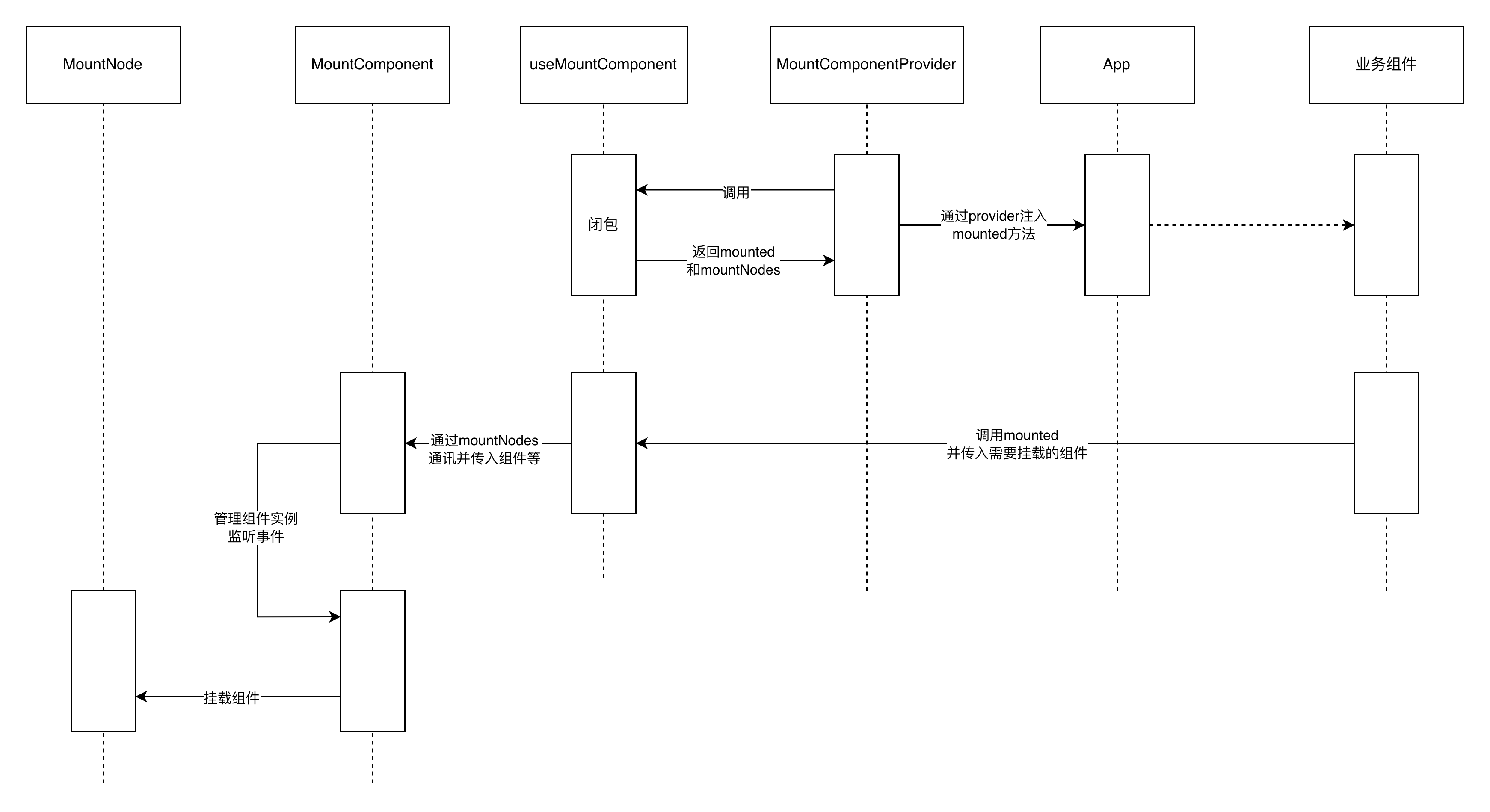
具体的时序图如下:
使用方式
export function createAutoCollectFormDialog(
  FormComment: any,
  commentProps?: any,
) {
  return defineComponent({
    name: "AutoCollectManualDialog",
    props: {
      visible: Boolean, // MountNode 传入的 visible 状态
    },
    emits: ["close", "closed"], // MountNode 传入的 close 和 closed 事件
    setup(props, ctx) {
      return () => {
        return (
          <AutoCollectFormModal
            onClose={() => {
              ctx.emit("close");
            }}
            onClosed={() => {
              ctx.emit("closed");
            }}
            model-value={props.visible}
            {...ctx.attrs} // 透传其他属性
          >
            <FormComment {...(commentProps || {})} />
          </AutoCollectFormModal>
        );
      };
    },
  });
}
AutoCollectFormModal为el-dialog的封装,需要实现自定义的v-model;业务组件通过参数的形式传入;之前调用mounted只是挂载一个组件,会直接显示在页面(MountComponentProvider包裹的元素后),封装弹窗组件后,就真正实现调用函数打开弹窗的交互了。
mounted(createManualFormDialog(addZone, { initialValues }), {
  title: initialValues ? "编辑方案" : "新增方案",
  handleConfirm(formValues: any) {
    // AutoCollectFormModal 中实现自动表单收集
    // 处理表单提交
  },
});
总结
通过以上方式,实现了弹窗的按需挂载,以及组件的封装,使得业务组件可以更加专注于业务逻辑,而不需要关心弹窗的显示/隐藏状态;同时,也实现了弹窗的统一管理,使得代码更加简洁,易于维护。